

If you have ever stood in front of an old arcade cabinet and wished you could take that exact feeling home, X-Arcade is the brand that has been promising to do just that for more than two decades. The single question most buyers are really asking is this: is an X-Arcade controller a genuinely great way to play retro arcade games at home, or are you paying a premium for nostalgia and marketing? The short answer is that X-Arcade builds some of the most durable, authentic-feeling arcade controllers you can buy, and the flagship Tankstick remains a legitimate way to recreate a two-player cabinet on your PC or TV. But it is not the right choice for everyone, and there are real trade-offs around price, setup, and the joystick feel that competitive players care about. This review walks through all of it honestly.
PrimeVouch Score: 8.2 / 10
Best for: Retro arcade and MAME fans, families who want a plug-and-play two-player cabinet experience, and anyone who values build quality and a lifetime guarantee over cutting-edge fighting-game precision.
What we loved:
- Genuinely tank-like build quality with real arcade-grade parts
- A lifetime guarantee that almost nobody else in this category offers
- Broad compatibility with PC, Mac, MAME, emulators, and Raspberry Pi
- Two full player stations plus a trackball on the flagship Tankstick
- Long track record and a large community of setup guides and support
Watch out for:
- Console adapters are usually sold separately, adding to the real cost
- The classic restrictive-gate joysticks are not ideal for modern competitive fighting-game players
- It is heavy and large, so you need a dedicated surface for it
- Some users report needing driver tweaks or setup patience on Raspberry Pi and certain emulators
- Pricing sits at the premium end of arcade controllers
What makes X-Arcade different
X-Arcade is made by XGaming, one of the longest-running producers of home arcade hardware in the United States. The company has been shipping arcade joysticks and cabinets for over twenty years, and that longevity is a big part of the story. In a category full of cheaply made plastic sticks that ship from overseas warehouses and disappear a year later, X-Arcade has stuck around long enough to build a reputation, a support library, and a genuine parts ecosystem.
The core philosophy is durability. X-Arcade repeatedly describes its controllers as indestructible, and while that is marketing language, it is grounded in something real. The units use heavy, commercial-grade components rather than the lightweight parts you find on budget sticks. The flagship Tankstick weighs in around fifteen pounds and is built from a solid metal-and-wood-style chassis with genuine arcade microswitches and buttons. This is not a controller you toss in a drawer; it is a piece of equipment meant to live on a table and take a beating for years.
The second differentiator is the lifetime guarantee. X-Arcade backs its joysticks with a guarantee that is unusually generous for consumer gaming hardware. If a switch or button wears out, the company’s position is that it will help you keep the unit running. Combined with the fact that the parts are standard arcade components you can source and swap yourself, this makes an X-Arcade one of the few controllers you can realistically expect to still be using a decade from now. That long-term value proposition is central to why the brand can command premium pricing.
The third thing that sets X-Arcade apart is compatibility breadth. The controllers are designed to work across an enormous range of systems: any modern PC, Mac, MAME, essentially every emulator and front end, Raspberry Pi builds, Android devices, and older consoles by way of adapters. Out of the box over USB it behaves like a keyboard, so most emulation software recognizes it immediately without drivers. That universality is a real strength for anyone assembling a retro setup.
The star product
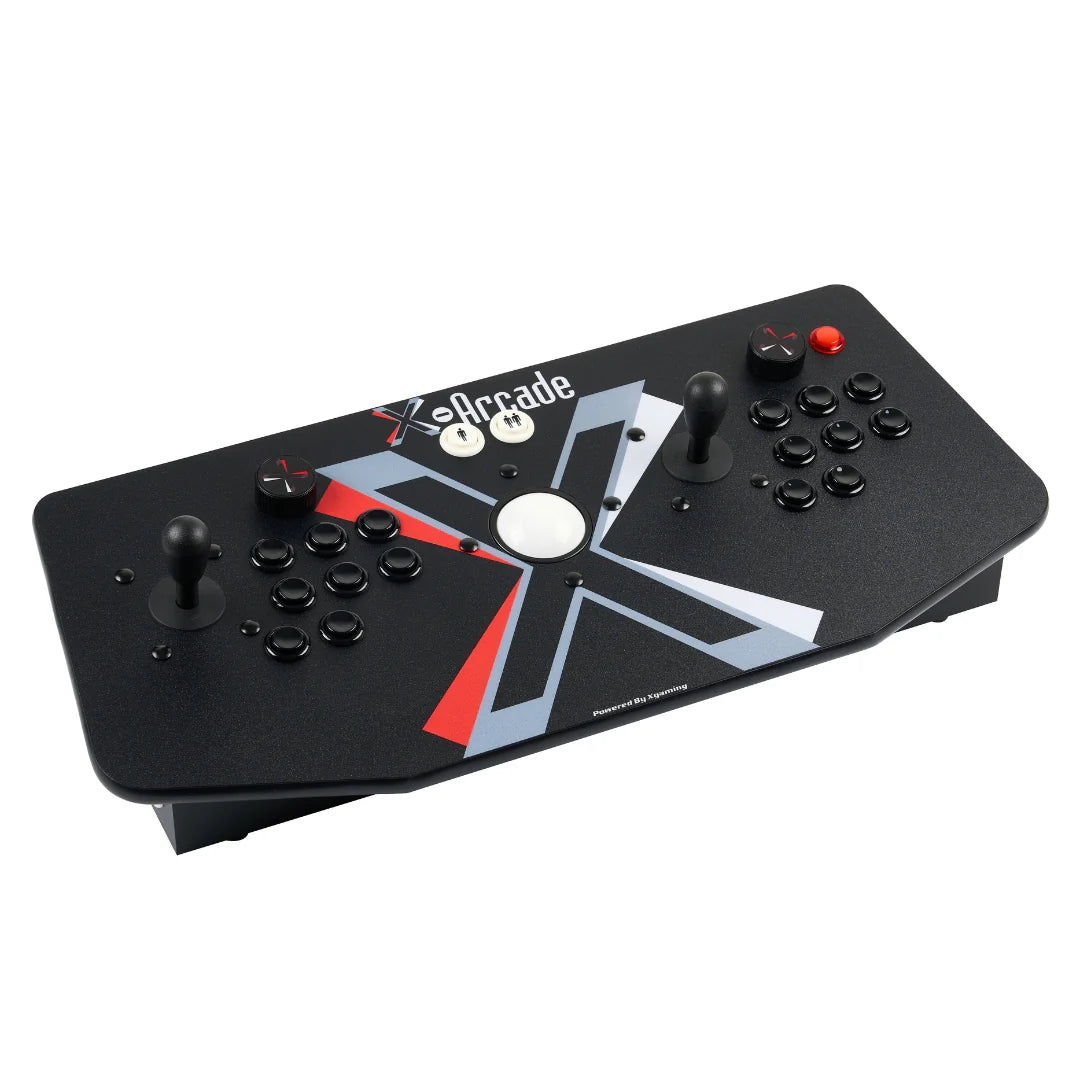
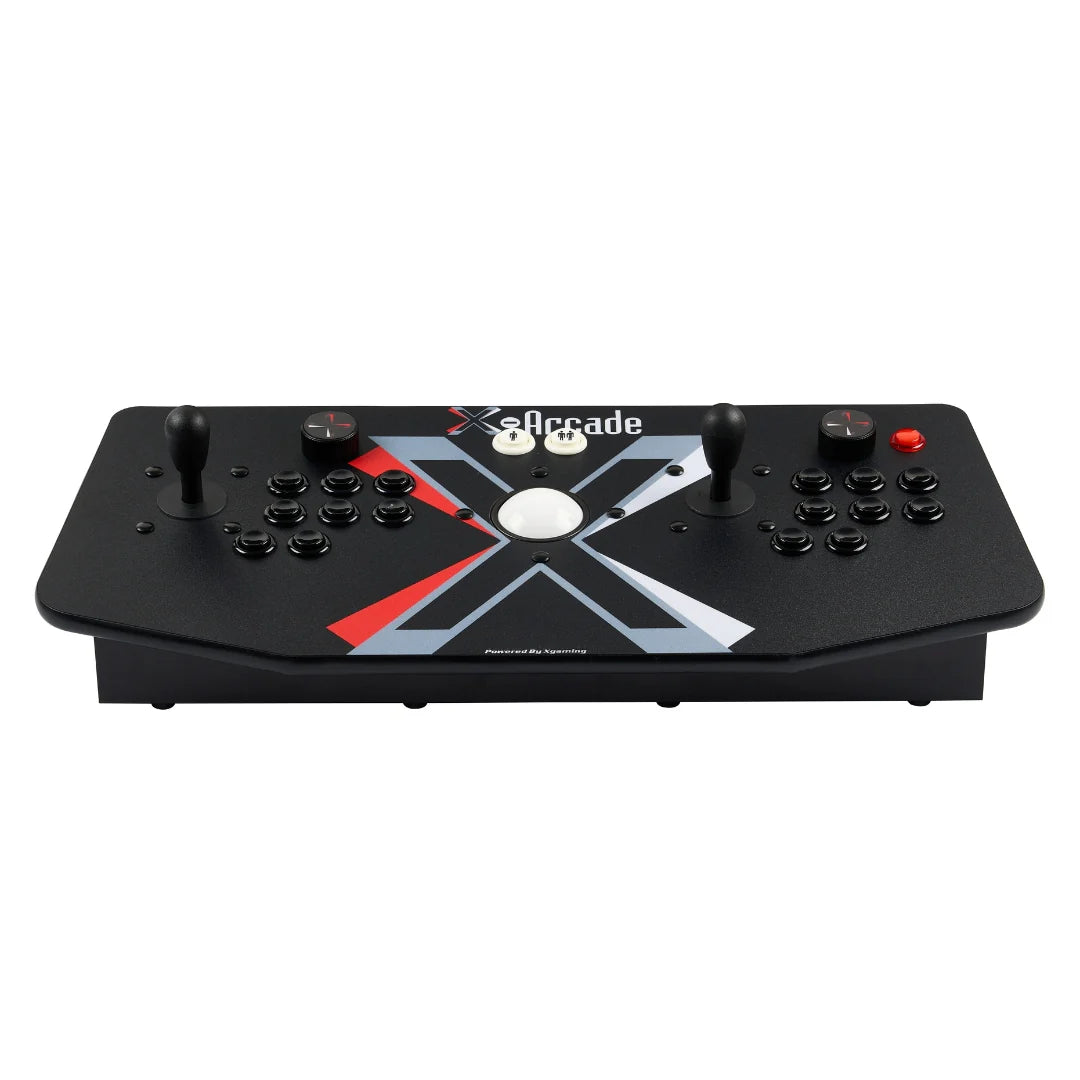
The X-Arcade Tankstick is the product that defines the brand, and for good reason. It is a two-player control panel with two eight-way joysticks, a full set of large arcade push buttons for each player, dedicated pinball flipper buttons on the sides, and a three-inch industrial trackball mounted in the center. In other words, it is essentially the control deck of a classic multi-game arcade cabinet, packaged as a standalone controller you can set on any table.
The trackball is what separates the Tankstick from the cheaper Dual Joystick model. It is recognized by your computer as a standard three-button mouse with no drivers required, which means it works instantly with trackball classics like Centipede, Marble Madness, Golden Tee-style golf games, and Missile Command, and it doubles as a normal mouse for navigating your front end. For a certain kind of arcade fan, that trackball is the whole reason to buy the Tankstick over a plain joystick.
In day-to-day use, the appeal is authenticity. The joysticks and buttons feel like the real thing because, functionally, they are the real thing: genuine arcade microswitches with that satisfying mechanical click. Reviewers over the years, from IGN to PC Gamer to PCMag, have repeatedly called it one of the best arcade joysticks available, and many long-term owners report using the same unit for years of heavy play without failure. The two-player layout makes it ideal for head-to-head fighting games and cooperative classics, recreating the shoulder-to-shoulder arcade experience that a single gamepad simply cannot.
It is worth being honest about the flip side. The Tankstick’s joysticks use a classic restrictive gate design, which is faithful to old cabinets but is not the octagonal or square-gate feel that modern competitive fighting-game players often prefer. A minority of users have also reported responsiveness quirks or the need to fine-tune settings in certain emulators. For the intended audience of retro and casual arcade play, none of this is a dealbreaker, but a hardcore Street Fighter tournament player might want a specialized Japanese-style stick instead. The Tankstick is also genuinely large and heavy, so plan for a permanent home for it rather than something you swap in and out.
The rest of the range
Tankstick MAX
The Tankstick MAX is the modernized, upgraded take on the classic Tankstick. It keeps the two-player-plus-trackball formula but refreshes the design and internals for buyers who want the flagship experience with contemporary touches. If you want the full arcade deck and want the newest revision, this is the model to look at.
Tankstick / Tankstick with Trackball
The original Tankstick with Trackball remains the heart of the lineup. It is the two-player control panel with the three-inch trackball, sold with a USB cable and optional console adapters. This is the definitive “arcade cabinet on a table” product and the one most people picture when they think X-Arcade.
Dual Joystick
The Dual Joystick is essentially the Tankstick without the trackball. It offers the same two-player joystick-and-button layout and the same rugged build at a lower price. If you play primarily fighting games and side-scrollers and do not care about trackball titles, the Dual can save you money.
Solo Joystick
The Solo is a single-player arcade stick for people who want the X-Arcade build quality in a smaller, more affordable, one-player footprint. It is a good entry point and a natural fit for a single-player emulation station or a fight-stick replacement.
Arcade2TV-XR and Tankstick VR
The Arcade2TV-XR line is X-Arcade’s newer, more all-in-one direction, designed to bring the arcade experience to any HDTV with minimal fuss and, in the VR variant, extend it further. These are the models the company is actively promoting as its modern flagship, aimed at buyers who want a more complete plug-and-play package rather than a bare controller.
Arcade cabinets and machines
For buyers who want the full stand-up experience, X-Arcade also produces complete arcade cabinets and machines. These are commercial-grade, award-winning units at a much higher price point, aimed at people building a game room centerpiece rather than a desktop setup.
Arcade parts and X-Adapters
Rounding out the range are replacement arcade parts (buttons, switches, joysticks, trackball components) and the X-Adapter line, which lets you connect an X-Arcade controller to specific game consoles. The parts catalog is a meaningful part of the value story, because it is what makes an X-Arcade genuinely repairable and long-lived.
How to choose / set it up
Choosing the right X-Arcade comes down to three questions. First, how many players do you want to support at once? If you want authentic two-player head-to-head play, you need a Tankstick, Tankstick MAX, or Dual Joystick. If it is just you, the Solo Joystick is cheaper and smaller. Second, do you want a trackball? If titles like Centipede, Missile Command, and golf games matter to you, choose a model with the trackball; if not, the Dual Joystick saves money. Third, what are you plugging into? For a PC, Mac, or Raspberry Pi, any USB model works out of the box. For older consoles, budget for the appropriate X-Adapter, since these are typically sold separately.
Setup on a PC or Mac is about as easy as it gets: connect the USB cable, and the controller is recognized as a standard input device with no drivers required. Most emulators and front ends detect it immediately, and X-Arcade provides a configuration utility on Windows that can map the unit to keyboard input or emulate an Xbox controller depending on what your games expect. The hardware is also programmable directly on the unit itself by connecting a PS/2 keyboard, which lets you remap buttons without any software.
Raspberry Pi and dedicated emulation builds are where a little patience helps. Many ready-made RetroPie and similar images work plug and play, but if you are building your own image you may need to install or configure a driver and map the controls. This is well documented by both X-Arcade and the wider retro community, and it is a one-time task, but it is worth knowing before you buy if you are not comfortable tinkering. Once configured, the Tankstick pairs beautifully with a Pi connected to a TV to create a compact arcade machine for a fraction of the cost of a full cabinet.
Watch: X-Arcade in action
To see the Tankstick unboxed and put through its paces, the video below walks through the hardware, build quality, and real-world play so you can judge the feel for yourself before buying.
X-Arcade vs alternatives
X-Arcade does not exist in a vacuum. Here is how it compares to the two most common alternatives buyers weigh against it: a mainstream fight stick and a DIY build.
| Option | Strengths | Trade-offs |
|---|---|---|
| X-Arcade Tankstick | Two players plus trackball, real arcade parts, lifetime guarantee, huge compatibility, repairable | Premium price, heavy, classic gate feel, adapters cost extra |
| Mainstream fight stick (single-player arcade stick) | Optimized joystick feel for competitive fighting games, portable, often cheaper for one player | Single player only, no trackball, less rugged, usually no lifetime guarantee |
| DIY arcade control panel | Fully customizable parts and layout, potentially lower cost, exactly the feel you want | Requires wiring and building skills, no warranty, time investment, no support line |
The pattern is clear. A dedicated fight stick beats X-Arcade on competitive joystick feel for one player, and a DIY build can beat it on customization and sometimes cost if you enjoy the project. But nothing else easily matches X-Arcade’s combination of two-player play, a built-in trackball, commercial-grade durability, a lifetime guarantee, and true plug-and-play compatibility in a finished product you can buy today.
Price & value
There is no getting around it: X-Arcade sits at the premium end of arcade controllers. The Tankstick with Trackball has a regular price around $199, and the brand runs frequent site-wide sales that bring that number down. The Dual Joystick and Solo Joystick are cheaper, and complete arcade cabinets cost considerably more. On a pure spec sheet, you can find lighter, cheaper arcade sticks online.
The value argument rests on longevity and completeness. When you factor in the lifetime guarantee, the genuine arcade parts, the repairability, and the fact that you are getting two full player stations and a trackball in one finished, supported product, the price starts to look reasonable rather than steep, especially against the cost and effort of building an equivalent panel yourself. A cheap stick that fails in a year is not actually cheaper than a controller you use for a decade. That is the core of X-Arcade’s value proposition, and for the right buyer it holds up well.
Because X-Arcade runs regular promotions, timing your purchase around a sale meaningfully improves the value. It is worth checking for current discounts before you buy rather than paying full list price.
Who should buy — and who should not
You should buy an X-Arcade if you are a retro and MAME enthusiast who wants an authentic, durable arcade experience at home; if you want genuine two-player head-to-head play with friends or family; if you value a lifetime guarantee and repairable hardware over disposable gadgets; or if you are building an emulation station on a PC, Mac, or Raspberry Pi and want a controller that will outlast the rest of the setup. For those buyers, X-Arcade is close to ideal and the Tankstick is the obvious pick.
You should probably look elsewhere if you are primarily a competitive fighting-game player who wants a specialized modern joystick feel, in which case a dedicated tournament-grade fight stick will serve you better. You should also skip it if you want something small and portable, if you are on a tight budget and durability is not a priority, or if you genuinely enjoy building your own control panel and would rather have that project than a finished product. And if you only ever play with a standard gamepad and do not care about the arcade feel, an X-Arcade is more controller than you need.
Honest limits
To keep this review balanced, here are the real limits worth repeating. The classic joystick gate is authentic but not tuned for modern competitive fighting games, and a small number of owners report responsiveness quirks that require settings adjustments. Console support depends on adapters that are usually sold separately, so the sticker price is not always the total price. The unit is heavy and large, which is a feature for stability but a drawback if you lack a permanent home for it. And while PC and Mac setup is trivial, custom Raspberry Pi builds can require a driver install and some configuration patience. None of these are hidden defects; they are the natural trade-offs of a rugged, authentic, universal arcade controller, and knowing them up front is the best way to avoid disappointment.
X-Arcade discount codes & deals
X-Arcade regularly runs site-wide promotions, including seasonal sales that discount the entire store and occasional bundled software offers with purchase. Because these deals rotate and the flagship models are the ones most often discounted, the smartest move is to check for a live promotion before you check out rather than paying full list price. A sale on a Tankstick or Tankstick MAX can turn an already-solid value into an excellent one. To see the latest active discounts and confirm current pricing, Shop X-Arcade deals and grab the best available offer before it rotates out.
Frequently asked questions
Does the X-Arcade Tankstick work with MAME and emulators?
Yes. The Tankstick is designed to be fully compatible with MAME and essentially every emulator and front end. Over USB it is recognized as a standard input device, so most emulation software detects it immediately, and the trackball works as a standard mouse without drivers.
Do I need adapters to use it with a game console?
For a PC, Mac, or Raspberry Pi you only need the included USB cable. To connect an X-Arcade to older game consoles you generally need the appropriate X-Adapter, which is typically sold separately, so factor that into your budget if console play matters to you.
Is the trackball worth paying extra for?
If you love trackball classics like Centipede, Missile Command, Marble Madness, and golf games, yes. The trackball also doubles as a normal mouse for navigating your menus. If you play mostly joystick-and-button titles like fighters and side-scrollers, the trackball-free Dual Joystick can save you money.
Is it really as durable as they claim?
The build quality is legitimately excellent. It uses genuine arcade-grade parts, weighs around fifteen pounds, and is backed by a lifetime guarantee. Many long-term owners report years of heavy use without failure, and because the parts are standard arcade components, the unit is genuinely repairable.
Can competitive fighting-game players use it?
You can, and plenty of people enjoy fighters on it, but the classic restrictive-gate joysticks are tuned for authentic retro feel rather than modern competitive precision. Serious tournament players often prefer a specialized fight stick, while casual and retro players are well served by the X-Arcade.
How hard is it to set up on a Raspberry Pi?
Many ready-made retro gaming images work plug and play. If you build your own image, you may need to install a driver and map the controls, which is a one-time task that is well documented by X-Arcade and the community. Once configured, a Tankstick plus a Pi makes an excellent low-cost arcade machine.
Building a retro arcade setup with X-Arcade
If this review has you picturing a home arcade, here is a practical roadmap for building one around an X-Arcade controller. Start with the brain of the system. The cheapest and most popular path is a Raspberry Pi running a retro gaming distribution, which can drive any HDTV and handle thousands of classic titles. If you want more power for later systems, a small dedicated PC or an existing gaming PC works just as well and pairs with the Tankstick over USB with no fuss.
Next, choose your controller based on the earlier guidance: a Tankstick or Tankstick MAX for two-player-plus-trackball authenticity, a Dual Joystick if you want two players without the trackball, or a Solo for a single-player station. Mount or place it on a stable surface at a comfortable standing or sitting height, since part of the arcade magic is the ergonomics of leaning into the controls the way you did in the arcade.
Then load your software. A good front end like a modern arcade launcher ties everything together with cabinet-style menus, box art, and easy game selection, so your setup feels like a real machine rather than a file browser. Take the time to map the X-Arcade properly, using the on-unit programming or the Windows configuration utility, so that every game responds correctly and the trackball and flipper buttons come alive where they should.
Finally, think about the room around it. A dedicated display, decent speakers, and a little arcade-style lighting turn a controller on a desk into an experience. Because X-Arcade hardware is built to last and fully repairable, it is the one part of this build you will not have to replace as your setup grows. Start with the controller, add the pieces over time, and you end up with a genuine home arcade that recreates the feeling that made you want one in the first place. When you are ready to begin, Shop X-Arcade deals and start with the hardware everything else is built around.