
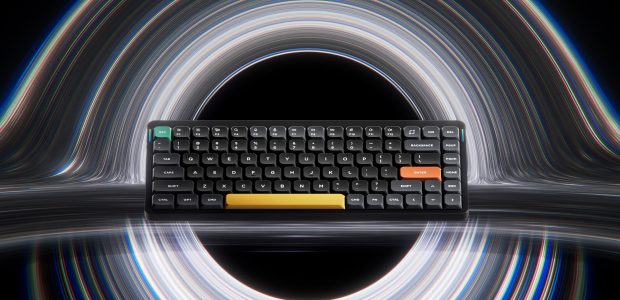

If you are shopping for a mechanical keyboard that is slim enough to travel, quiet enough for an open office, and still satisfying enough to type on all day, one brand comes up again and again: NuPhy. The question most buyers actually have is simple — is a NuPhy keyboard worth the premium over a Keychron or an Epomaker, and which model should I get? This review answers exactly that. We looked at NuPhy’s lineup across the low-profile Air series, the enthusiast Halo and Gem boards, the hybrid Kick75, and the magnetic-switch Field and HE gaming boards, weighed the real strengths against the real annoyances, and boiled it down to a clear recommendation.
Short version: NuPhy makes some of the best low-profile wireless keyboards you can buy, with genuinely excellent typing feel and sound for the category, but it is not flawless — firmware updates can be finicky and the low-profile keycap ecosystem is narrow. Read on for the full breakdown.
PrimeVouch Score: 8.6 / 10
Best for: Mac and laptop users who want a portable, low-profile mechanical keyboard that types and sounds better than almost anything else in its class, plus tinkerers who love QMK/VIA remapping and hot-swap switches.
What we loved:
- Class-leading sound and typing feel straight out of the box, thanks to real sound-dampening (Poron plate foam, IXPE PCB film, silicone spacebar tuning).
- Genuinely thin and portable — the Air75 V2 is just 13.5 mm tall and sits on top of most laptops, MacBooks included.
- Tri-mode connectivity (2.4 GHz, Bluetooth 5.1, wired USB-C) with a fast 1000 Hz polling rate over the 2.4 GHz dongle.
- Open QMK/VIA firmware on the Air V2 and enthusiast boards — remap anything, no proprietary app required.
- Hot-swappable switches and a large, thoughtfully lubed in-house switch lineup (Aloe, Cowberry, Wisteria, Moss) plus upgraded Gateron 2.0 options.
- Big 4000 mAh battery on the Air75 V2, rated up to 220 hours with the lights off.
Watch out for:
- Firmware updates can be fiddly — the keyboard, RF, and dongle firmware sometimes need to be updated together or the dongle stops connecting.
- Low-profile keycaps are a niche standard, so third-party keycap choices are limited compared with normal-profile boards.
- Bluetooth polling is capped much lower than 2.4 GHz, so serious gamers must use the dongle.
- Occasional macOS quirks have been reported on the low-profile boards.
- You pay a premium over budget rivals for that fit-and-finish.
What makes NuPhy different
Plenty of companies make wireless mechanical keyboards. What sets NuPhy apart is that it treats low-profile boards — the flat, slim kind you would actually put in a bag — with the same obsessive attention that enthusiast builders reserve for tall, gasket-mounted “endgame” keyboards. For years, low-profile mechanicals were an afterthought: hollow-sounding, rattly, with mushy stabilizers and cheap keycaps. NuPhy’s whole reason for existing is to prove that a slim keyboard does not have to feel or sound cheap.
The proof is in the internals. On the Air75 V2, NuPhy borrowed the acoustic tricks normally found in full-size custom boards and shrank them: a Poron plate foam layer to absorb hollow reverb, an IXPE film on the PCB to purify the switch sound, and a silicone-tuned spacebar to stop the usual rattle. The result is a low-profile board that produces a controlled, “thocky-for-its-size” sound instead of the tinny clack most flat keyboards make. That engineering-first mindset carries across the range.
The second differentiator is choice. NuPhy designs and manufactures its own low-profile switches — floral-named linears and tactiles like Aloe, Cowberry, Wisteria, and Moss, each with published travel and force specs — and every modern board is hot-swappable, so you are never locked into one feel. Add open QMK/VIA firmware on the flagship boards, and NuPhy sits in a rare spot: approachable enough for a first-time buyer, deep enough for a keyboard nerd. That is the core of why NuPhy has earned a strong reputation among enthusiasts rather than just mainstream reviewers.
The star product: NuPhy Air75 V2
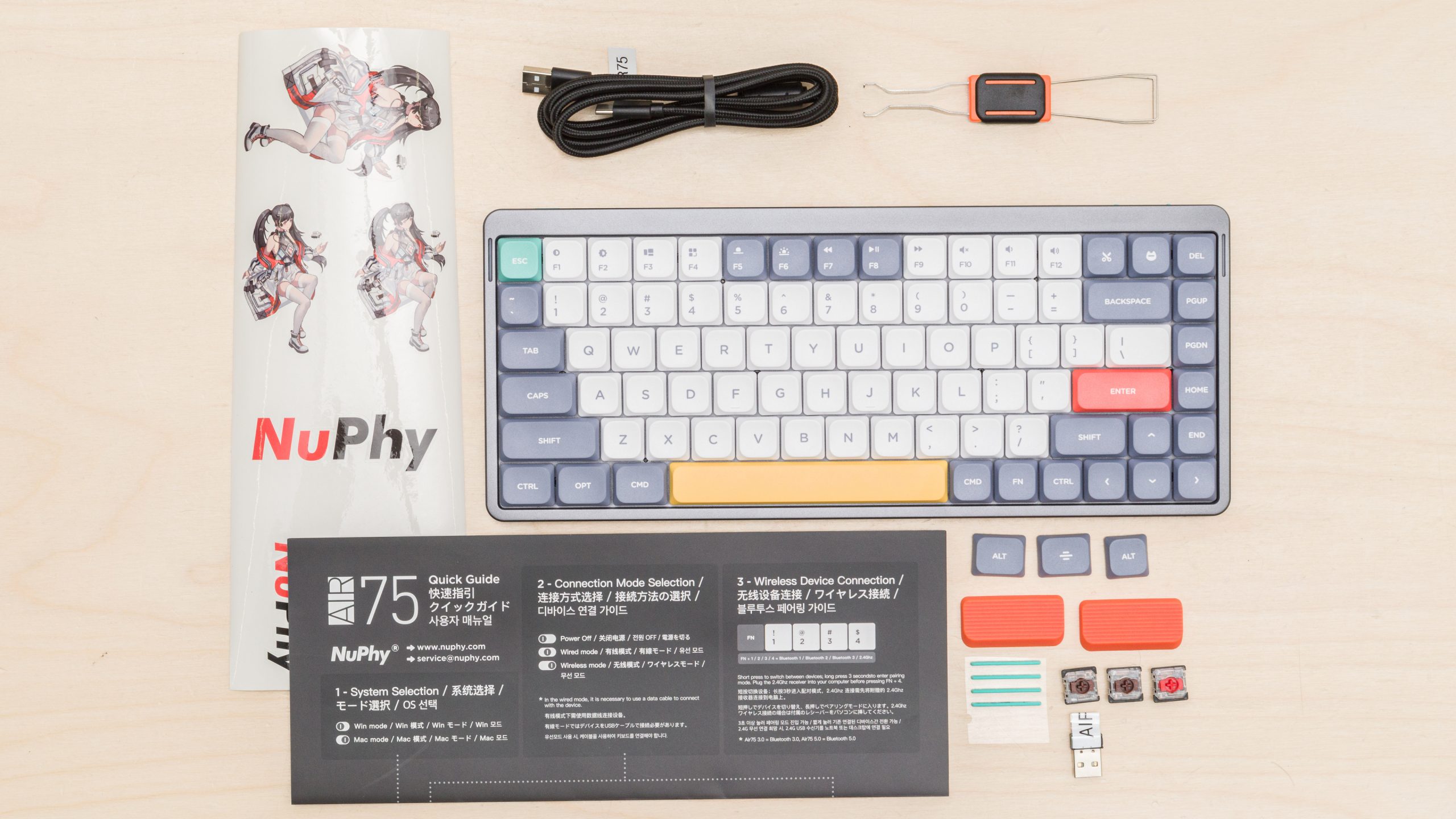
If NuPhy has a signature product, it is the Air75. The current mainstream pick is the Air75 V2, a 75% low-profile board (84 keys, ANSI) that packs a function row, arrow keys, and a navigation column into a footprint about the size of a small laptop. It measures roughly 316 x 132 x 13.5 mm and weighs 598 grams, with an aluminum top frame and a textured, semi-transparent ABS bottom case that shows off the color-matched internals. There is a newer Air75 V3 as well, but the V2 remains the value sweet spot and the model most widely recommended.
Here is why it earns the “star” label. Connectivity is tri-mode: 2.4 GHz via the bundled dongle at a full 1000 Hz polling rate, Bluetooth 5.1 for up to four paired devices, and wired USB-C. Latency over the dongle is low enough that NuPhy positions it alongside proper gaming keyboards, and in normal typing it is genuinely indistinguishable from wired. The 4000 mAh battery is large for a board this thin — NuPhy rates it around 35 to 57 hours with all the RGB lighting on, and up to 220 hours with lights off.
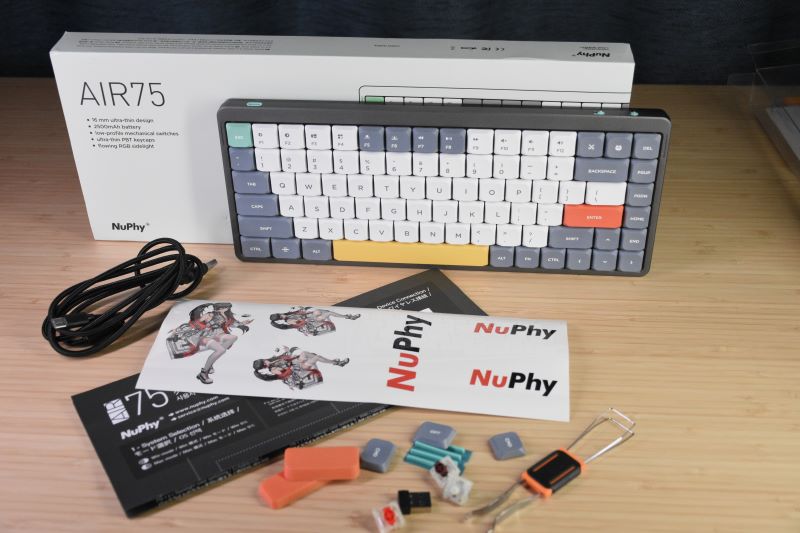
The typing experience is the real draw. The V2 ships with double-shot PBT keycaps that resist shine and keep their legends, factory-lubed switches, and the sound-dampening stack described above. Two RGB light bars on the aluminum sides double as status indicators for caps lock, connection mode, battery, and system mode. Every switch is hot-swappable, and NuPhy even throws four spare switches and extra keycaps in the box so you can experiment on day one. Firmware is QMK/VIA, meaning you can remap keys and build macros in a browser without installing proprietary software.
It is not perfect. The macOS experience has had occasional bugs, and firmware updates require care — more on that below. But as an all-day driver that also fits in a bag, the Air75 V2 is hard to beat.
The rest of the range
NuPhy’s catalog has grown well beyond the Air. Here is how the key models fit together.
Air60 and Air96
The Air60 is the compact 60% sibling for people who want the smallest possible low-profile board and do not need arrow keys or a function row as dedicated keys. The Air96 pushes the other direction, adding a number pad and extra function keys in a 96% layout while keeping the same slim profile and sound engineering. Both share the Air family’s DNA — pick your size based on how much you rely on a numpad and dedicated navigation keys.
Halo75 and Halo65
The Halo series is NuPhy’s answer to the enthusiast, normal-profile crowd. The Halo75 V2 is an affordable gasket-mounted 75% board with hot-swap switches, 1000 Hz polling over 2.4 GHz, QMK/VIA, and a sound profile that punches above its price. The Halo65 shrinks that formula into a 65% layout. If you like the taller, “thockier” custom-keyboard feel rather than the flat low-profile experience, the Halo line is where to look.
Kick75
The Kick75 is the most playful board in the lineup and something genuinely novel: it can swap between low-profile and normal-profile switches in the same chassis, which almost nothing else on the market does. It leans into retro styling with a translucent top case that acts as an RGB diffuser and evokes classic handheld-console vibes. For modders and people who cannot decide between low and standard profile, it is a clever one-board answer.
Gem80
The Gem80 is NuPhy’s board for modders and barebones builders — a tenkeyless-ish 80% platform with heavy sound dampening, an mSA keycap profile, 1000 Hz polling over 2.4 GHz, and a broad switch selection. It is the pick if you want a premium canvas to customize rather than a plug-and-play board.
Field series and Air75 HE (magnetic switches)
The Field series and the Hall-effect (HE) boards — including the Field75 HE, Air75 HE, and Air60 HE — use magnetic switches with adjustable actuation and rapid-trigger features aimed at competitive gaming. These are the models to consider if millisecond-level responsiveness and per-key actuation tuning matter more to you than the classic mechanical feel.
Node series and newer boards
NuPhy has continued to expand with the Node series (low- and high-profile options at an accessible price) and gaming-focused boards like the WH80. The lineup moves quickly, so it is always worth checking the current catalog for the newest revision before buying.
How to choose the right NuPhy
With this many models, picking one comes down to a few honest questions.
- Do you want thin and portable, or tall and thocky? Choose the Air series (low-profile) if you travel, use a laptop, or simply prefer a flat keyboard. Choose Halo or Gem (normal-profile) if you want the deep, cushioned custom-keyboard feel and do not mind a taller board.
- How big a layout do you need? Air60/Halo65 for minimalists, Air75/Halo75/Kick75 for the popular do-everything 75% size, Air96 for anyone who needs a number pad.
- Is competitive gaming your priority? Look at the Field and HE magnetic-switch boards for adjustable actuation and rapid trigger, and always use the 2.4 GHz dongle rather than Bluetooth.
- Do you love to tinker? The Kick75 (high/low profile swap) and Gem80 (barebones modding platform) reward customization; QMK/VIA support across the flagship boards means deep remapping either way.
- What is your budget? The Node series and Air75 V2 sit at the accessible end, while HE and premium gaming boards cost more.
Watch: NuPhy in action
Before you commit, it helps to see and hear one of these boards in a real review — sound is a huge part of the NuPhy appeal, and no spec sheet captures it. The video below walks through the Air75 experience in detail.
NuPhy vs alternatives
NuPhy does not compete in a vacuum. Here is how it stacks up against the two brands buyers cross-shop most.
| Brand | Best known for | Strengths | Trade-offs |
|---|---|---|---|
| NuPhy | Premium low-profile wireless boards (Air series) plus enthusiast Halo/Gem | Best-in-class low-profile sound and feel, tri-mode wireless, QMK/VIA, hot-swap, strong build | Higher price, fiddly firmware updates, niche low-profile keycap ecosystem |
| Keychron | Broad, value-focused Mac/Windows mechanical lineup | Huge model selection, strong value, easy availability, solid QMK/VIA options | Low-profile models generally do not match NuPhy’s tuned sound; less distinctive design |
| Epomaker | Feature-packed budget and gaming boards | Aggressive pricing, gaming-focused Hall-effect options, lots of RGB and styling | Build and refinement can be inconsistent; less enthusiast credibility than NuPhy |
The takeaway: Keychron is the safe, wide-selection default and usually a bit cheaper; Epomaker is the value-and-gaming play; NuPhy is the choice when low-profile typing quality and design are your priorities and you are willing to pay a little more for them.
Price & value
NuPhy sits in the upper-mid tier of the mechanical keyboard market — above bargain brands, below true boutique customs. The Air75 V2 is the anchor of the lineup and typically the best value; the newer Air75 V3, HE gaming boards, and premium modding platforms cost more, while the Node series lands at a more accessible price. Exact pricing shifts with sales, region, and configuration (switch type and accessories add to the total), so always confirm the current figure on the product page before buying.
Is it worth the premium? For most people who care about how a keyboard sounds and feels — and who value a slim, travel-friendly form factor — yes. You are paying for real sound engineering, a good keycap set, hot-swap flexibility, and open firmware, not just a logo. If you only need a functional wireless board and do not care about acoustics, a cheaper Keychron or Epomaker will serve you fine and save money. The value case for NuPhy is strongest precisely where budget boards are weakest: the low-profile category.
Who should buy — and who should not
Buy a NuPhy if you: use a laptop or MacBook and want a slim mechanical board that travels; care a lot about typing sound and feel; want hot-swap switches and QMK/VIA remapping; appreciate distinctive, well-built design; or want the best low-profile mechanical experience available and will pay a modest premium for it.
Look elsewhere if you: want the absolute lowest price and only need basic wireless typing; are a competitive esports player who requires a wired 8000 Hz board (NuPhy’s wireless is excellent but not built for that extreme); rely heavily on a vast third-party keycap ecosystem (low-profile caps are limited); or have zero patience for occasional firmware housekeeping.
Honest limits
No brand deserves an uncritical write-up, so here are NuPhy’s genuine weak spots. Firmware is the biggest one: on the Air75 V2, updates to the keyboard, RF, and dongle firmware sometimes have to be applied together, and users who update one piece but not the others have reported the 2.4 GHz dongle refusing to connect even though Bluetooth still works. NuPhy has shipped fixes over time to improve Bluetooth and 2.4 GHz stability, but the process is more hands-on than it should be, and less technical buyers can find it intimidating.
Second, the low-profile keycap ecosystem is inherently limited. Because low-profile is a niche standard, you are mostly buying keycap sets from NuPhy itself rather than the vast aftermarket that normal-profile boards enjoy — and some accent keys can be awkward to change without buying a whole set. Third, Bluetooth polling is capped far below the 2.4 GHz mode, so wireless gamers must use the dongle. Finally, occasional macOS quirks have surfaced on the low-profile boards, and the overall price sits above budget competitors. None of these are dealbreakers for the right buyer, but you should go in with eyes open.
NuPhy discount codes & deals
NuPhy runs promotions around major sales events and product launches, and pricing can vary by region and configuration. Rather than chase codes that expire, the reliable move is to check the current live offers and bundle pricing before you buy — accessory bundles (folio cases, wrist rests, extra switches) sometimes deliver more real value than a headline discount.
We keep our NuPhy links pointed at the best available deals, so start here to see what is live right now: Shop the latest NuPhy deals. If you already know you want the Air75, going straight through that link is the simplest way to lock in current pricing and any active promotion.
Frequently asked questions
Is the NuPhy Air75 V2 or V3 the better buy?
The Air75 V2 remains the value pick and the model most people should buy — it delivers the core NuPhy experience (tri-mode wireless, QMK/VIA, hot-swap, tuned sound) at a lower price. The V3 refines the formula further, so if you want the newest revision and the incremental improvements, it is worth the step up. For most buyers, the V2 is the smart money.
Are NuPhy keyboards good for gaming?
Yes, with a caveat. Over the 2.4 GHz dongle the Air75 hits a 1000 Hz polling rate with low latency, which is plenty for the vast majority of players. For competitive, actuation-sensitive gaming, look at NuPhy’s Field and Hall-effect (HE) boards, which add adjustable actuation and rapid trigger. Just avoid Bluetooth for gaming, since its polling rate is much lower.
Can I change the switches on a NuPhy keyboard?
On the modern boards, yes — they are hot-swappable, so you can pull and replace switches with the included puller and no soldering. The Air75 V2 even ships with spare switches so you can try different feels immediately. Just make sure any replacement switches match the board’s profile (low-profile boards need low-profile switches).
Do NuPhy keyboards work with Mac?
Yes. NuPhy boards support macOS, Windows, Linux, Android, and iOS, and include a dedicated Mac/Windows mode plus Mac-specific keycaps and shortcuts. The low-profile Air boards are designed to sit on top of a MacBook’s keyboard. Note that a few macOS-specific quirks have occasionally been reported, so keep firmware current.
What software do NuPhy keyboards use?
The flagship boards (Air75 V2 and the enthusiast models) run open QMK/VIA firmware, which you can configure through a browser-based VIA app — no proprietary driver required. This lets you remap keys, build macros, manage layers, and tune lighting. Some older or entry models use NuPhy’s own Console software instead.
How long does the battery last?
The Air75 V2 has a 4000 mAh battery rated for roughly 35 to 57 hours with all RGB lighting on, and up to about 220 hours with the lights off, per NuPhy’s lab tests. Real-world life depends heavily on your brightness and connection mode, but turning lighting down dramatically extends runtime.
Low-profile vs standard switches: what you are actually choosing
Because NuPhy straddles both worlds, it is worth understanding the core trade-off. Standard (normal-profile) switches are the tall switches on most mechanical keyboards, typically with around 3.5 to 4 mm of total travel. They give you the deep, cushioned keypress and the resonant “thock” that enthusiasts chase, and they open the door to a massive aftermarket of keycaps and switches. The cost is height and bulk: a standard board sits well above the desk and is less comfortable to type on flat or to toss in a bag.
Low-profile switches are shorter, with reduced travel (NuPhy’s are around 3.0 to 3.2 mm total), which makes the whole keyboard dramatically thinner — the Air75 V2 is just 13.5 mm tall. The payoff is portability and a typing posture closer to a laptop, which many people find more comfortable for long sessions and easier on the wrists without a wrist rest. The trade-offs are a shallower, faster keypress that feels different from a classic mechanical, and a much smaller ecosystem of compatible keycaps and switches. NuPhy’s engineering — sound dampening plus in-house switches like the linear Aloe and Cowberry or the tactile Wisteria and Moss — is aimed squarely at closing the “feel” gap so that going low-profile costs you far less than it used to.
One more concept worth knowing is hot-swap. A hot-swappable board has sockets under each keycap that grip the switch pins, so you can pull a switch out and press a new one in by hand — no soldering iron, no permanent commitment. That is what makes experimenting cheap and safe: buy a few switch types, try them, and keep what you like. Every modern NuPhy board is hot-swappable, which is a big part of why the brand is friendly to both beginners and tinkerers. If you are new to mechanical keyboards, that single feature removes most of the risk of choosing “wrong” up front.
Ready to pick your board? Shop NuPhy deals and match the model to how you actually work and play.